Redirects:
Redirects helps in giving inputs from a file to command or sending command outputs to a file, which we can review those outputs later.
There are 3 Redirects in Linux
1. Standard input (STDIN)
2. Standard output (STDOUT)
3. Standard error (STDERR)
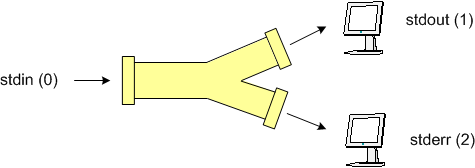
Standard input (STDIN):
STDIN is Basically, In which the command is expecting the input to come from a file
Syntax: <command1> < <command2>

Standard output (STDOUT):
STDOUT is Basically, In which the command is sending its output to a file
To send command outputs by erasing(overwrite) the existing content into a file:
Syntax: <command> > <filename>
eg: echo “hello sandeep” > file1.txt

We can also clear the content of a file using STDOUT
Syntax: > <filename>
eg: > file1.txt

To send command outputs without erasing the existing content in a file:
Syntax: <command> >> <filename>
eg: echo “hello sandeep” >> file1.txt
eg: echo “hello kiran” >> file1.txt

To view the file content:
Syntax: cat <filename>
eg: cat file1.txt

Standard error (STDERR):
STDERR is Basically, In which the command is sending only its errors as output to a file
To send command error outputs to a file, and only displaying the successfully executed outputs on the screen:
Syntax: <command> 2> <filename>

To send successfully executed command outputs and also its errors to a file:
Syntax: <command> &> <filename>

To send only successfully executed command outputs to one file and separately sending its error outputs to another file:
Syntax: <command> > <filename1> 2> <filename2>
eg: du -h > file1.txt 2> file2.txt

Pipes ( | ):
Pipe combines the commands, it acts like left side command output is the input for right side command
Syntax: <command> | <command>

Tee command:
tee is used to display the output on screen and also to store the output in a file simultaneously.
To send command outputs by erasing(overwrite) the existing content into a file and also displaying on the Screen:
Syntax: <command> | tee <filename>
eg: echo “hello” | tee file1.txt

To send command outputs without erasing the existing content in a file and also displaying on the Screen:
Syntax: <command> | tee -a <filename>
eg: echo “hello” | tee -a file1.txt


